Auto-snapshots & auto-restore
Undock, dock – your windows come back by themselves.
Windows piles every window onto the laptop screen when a monitor disappears, and it never moves them back. DeskScene remembers the layout of each monitor setup and restores it once the setup is stable again.
How it works
- 1
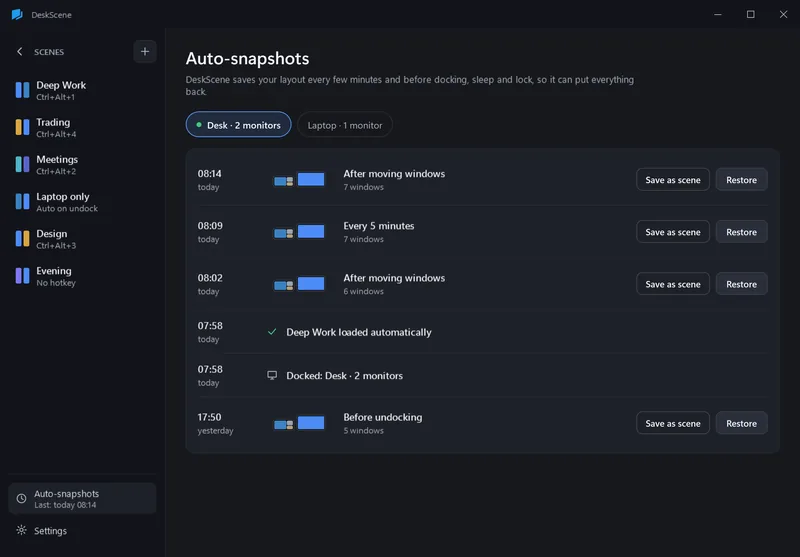
DeskScene takes a snapshot of your windows every 5 minutes (only when something moved), 3 seconds after you move or resize a window, before sleep and when you lock the PC.
- 2
The moment monitors start changing, snapshots freeze and the last 5 seconds are thrown away – Windows may already be moving windows around.
- 3
DeskScene recognizes the new setup by the EDID ids of its monitors and waits until it has been stable for a moment.
- 4
After a short delay (3 seconds by default) it loads the scene linked to this setup – or, if there is none, restores the last snapshot of this setup.
Good to know
A scene per setup
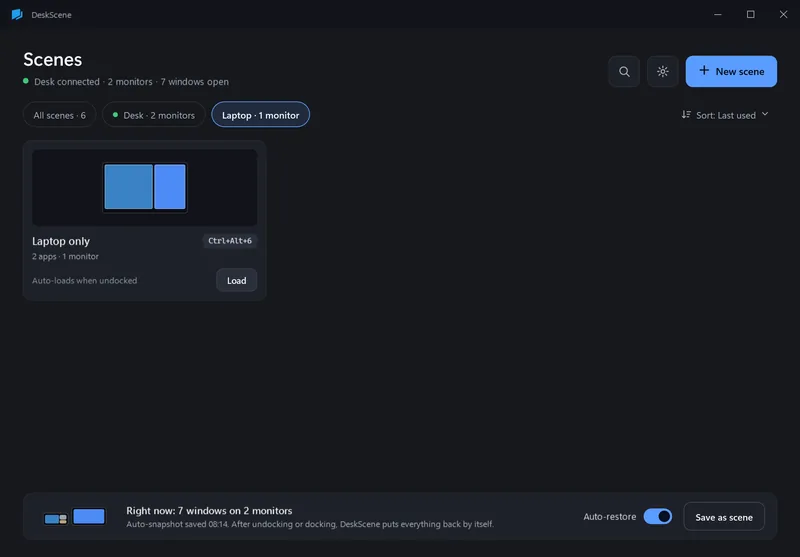
In the editor, “Load when … connects” links a scene to a setup – “Laptop only” when you undock, “Deep Work” at your desk. Each setup has at most one linked scene.
Snapshots are careful
A restored snapshot never starts apps and never minimizes other windows. Snapshots older than 14 days are not used automatically.
You can see what happened
The history lists every automatic action: setup changes, scenes loaded, snapshots restored. Each snapshot can be restored or saved as a scene by hand.
Adjustable
Settings → Auto-restore: on or off, delay after a setup change (0–30 s), snapshot interval (1, 5 or 15 min), snapshots kept per setup (20 by default).
FAQ
Questions
Does auto-restore start apps I had closed?
Only if a scene is linked to the setup and that scene has “Start apps that are not running” on. Restoring a snapshot only moves windows that are open.
What if I dock somewhere new?
An unknown setup is learned the first time it appears. From the next change on, DeskScene has snapshots for it; you can also link a scene to it right away.
Can I turn it off?
Yes: the “Auto-restore” switch in the tray flyout, in the gallery or in Settings. Scenes linked to a setup still load when it connects – unlink them in the editor.
Is it in the trial?
Yes, everything is. After the trial auto-restore needs the full version; snapshots keep being taken.